Showing posts with label computer tips. Show all posts

कम्प्युटर सम्बन्धी रमाइलो ट्रिक्सहरु


अब एक छिन रमाइलो Tricks ट्राइ गरेर हेरौ ,
तपाईंले यि tricks को प्रयोग गरेर आफ्नो साथी भाई
माझ Smart बन्न सक्नु हुन्छ ।

₹ Internet Explorer को Title चेन्ज गर्ने तरिका
१ Start > Run > र त्यहाँ gpedit.msc टाईप
गर्नुहोस् ।
२ त्यहाँ user configuration > Windows
... Settings > Internet Explorer Maintainance >
Browser User Interface र Browser Title लाई
Double क्लिक गर्नुहोस् ।
३ Costomize Title Bars लाई Activate गर्नुहोस् र
title Bar Text मा केही टाईप गर्नुहोस् , जे टाईप
गर्नु भए पनि हुन्छ केही फरक पर्दैन जस्तै :
Kathmandu टाईप गर्नुहोस् र ओके गर्नुहोस् ।
४ अब gpedit.msc लाई बन्द गरी दिनुहोस् ।
५ फेरी Start > Run > र त्यहा टाईप गर्नुहोस्
regedit
६ HKEY_CURRENT_USER\Software\Microsoft
\Internet Explorer\Main सम्म जानुहोस् ।
७ अब दाँया तिर Window Title कि खोज्नुहोस् र
त्यसमा डबल क्लिक गर्नुहोस् त्यहा तपाईंले Value
Data मा Microsoft Internet Explorer Provided
bt Kathmandu लेखेको पाउनु हुनेछ ।
८ अब त्यसलाई मेटेर तपाईंलाई के लेख्न मन छ
त्यो लेख्नुहोस् , यहाँ तपाईंले जे लेख्नु हुन्छ
त्यो तपाईंको Internet Explorer को title bar
मा display हुन्छ ।
९ अब regedit लाई बन्द गरिदिनुहोस् ।
१० अब Internet Explorer खोलेर हेर्नुहोस् ...
WinXp security : यदि तपाईंले step १ देखी ३ सम्म
गर्नु भएन भने तपाईंले Window Title कि भेट्टाउन
सक्नु हुन्न ।

Firefox Sidebar मा Facebook Chat Box बनाउनुहोस्


हुन त यदी तपाइंले Firefox Sidebar मा Facbook Chat Box बनाउनु भयो भने Chat गर्नको लागी मात्रै होइन जे जती तपाईं फेसबूकको पेजमा नै गएर गर्नुहुन्छ त्यो सबै System Firefox को Sidebar मा नै पनि गर्न सक्नुहन्छ जस्तै Status update, photo upload, video upload, notification etc मैले किन बरण गरी राख्नु पर्यो र यसको बारेमा छोटकरीमा भन्नु पर्दा फेसबुकको सबै तरीका त्यहि बाट पनि गर्न सकिन्छ अझै भन्नु पर्दा तपाइंलाई फेसबुकको पेजमा जानै पर्दैन र यती मात्रै होइन यदी हजुरले चाहनुभयो भने Firefox Sidebar मा नै त्यस Chat Box लाई सानो-ठुलो पनि बनाउन सकिन्छ र तपाइंलाई फेसबुक चलाउनको लागी फेसबुक पेजमा नै बसी राख्नु पर्दैन फेसबुकको सबै काम Firefox Sidebar बाट नै गर्न सक्नुहुन्छ र त्यती बेला तपैंकुनै पनि Site मा भ्रमण गर्नुस Facebook Box भने Sidebar मा देखिरहन्छ  बयान मात्रै धेरै भयो जस्तो छ त्यसैले आउनुस अब काम नै गरेर देखाउँ
१ सबैभन्दा पहिला Firefox लाई खोल्नुहोस र आफ्नो keyboard बाट "Ctrl+B"थिच्नुहोस र त्यहाँ "Bookmarks" खुल्नेछ
२. र तपाइंले त्यहाँ तल "Bookmarks Menu" मा Right Click गरी "New Bookmark..." मा Click गर्नुहोस

३. त्यसपछी अब त्यहाँ अर्को एउटा Dialog box खुल्नेछ र हजुरले त्यहाँ सबैभन्दा माथी Name: भनेको ठाउँमा आफुले चाहेको नाम राख्नुहोस र Location: भनेको ठाउँमा यो Code 
http://www.facebook.com/presence/popout.php pasteगर्नुहोस र तल "Load this bookmark in the sidebar" को खाली ठाउँमा Mark लगाएर "Add" button मा Click गर्नुहोस

४. अब Left side मा रहेको "Bookmarks Menu" मा Click गर्नुहोस यदी त्यहाँ Bookmarks Menu देखिएको छैन भने Ctrl+B थिच्नुहोस र अब Bookmarks menu को तल लिस्टमा हेर्नुहोस त्यहाँ अघि हजुरले लेखेको नाम को लिंक देखिनेछ र त्यसलाई Click गर्नुहोस र Facebook User Name: and Password type गरेर Log in गर्नुहोस

र अरु कुनै पनि बेला यदी हजुरले Firefox sidebar मा Facebook चलाउन मन लाग्यो भने Ctrl+B थिचेर Bookmarks Menu मा Click गरी आफुले बनाएको Chat 

New Facebook Codes for Chat


[[f9.laugh]]
[[f9.sad]]
[[f9.angry]]
[[f9.sleepy]]
[[f9.shock]]
[[f9.kiss]]
[[f9.inlove]]
[[f9.pizza]]
[[f9.coffee]]
[[f9.rain]]
[[f9.bomb]]
[[f9.sun]]
[[f9.heart]]
[[f9.heartbreak ]]
[[f9.doctor]]
[[f9.ghost]]
[[f9.brb]]
[[f9.wine]]
[[f9.gift]]
[[f9.adore]]
[[f9.angel]]
[[f9.baloons]]
[[f9.bowl]]
[[f9.cake]]
[[f9.callme]]
[[f9.clap]]
[[f9.confused]]
[[f9.curllip]]
[[f9.devilface] ]
[[f9.lying]]

Find The Serial Key of Any Software with a Simple Tricks


 The key 94FBR is a part of  Office 2000 Pro CD activation key that is widely distributed as it bypasses the activation requirements of Office 2000 Pro. By searching for 94fbr and the product name, you are guarantee that the pages that are returned are pages dealing specifically with the product you're wanting a serial for. Follow simple steps given below to learn this trick

    1. Go to Google
    2. Then type  Software Name 94FBR

    Replace Software Name with the name of software whose serial key you want to find
    Eg: To find serial key of Nero i will type Nero 94fbr

    3. Now press Enter and you will find serial key of software you are looking for as shown below.

Colorful Alphabets Emoticons for Facebook Chat

Today we have another cool and sweet looking chat tweak which you can use to attract the receiver and force him to reply to you so this is known as Colorful Alphabets Emoticons in my language you can call it anything which fits you well the preview is below


Now as you can see how beautiful it looks when you will this kind of message to your friends. So now if you like this thing and you wanna start a colorful alphabets emoticon chatting than you wanna use below code for different alphabets mentioned. SO whenever you paste code for any alphabet and you hit enter you will get colorful alphabets like above. So copy codes from below and start chatting.
[[107015582669715]] = A
[[116067591741123]] = B
[[115602405121532]] = C
[[112542438763744]] = D
[[115430438474268]] = E
[[109225112442557]] = F
[[111532845537326]] = G
[[111356865552629]] = H
[[109294689102123]] = I
[[126362660720793]] = J
[[116651741681944]] = K
[[115807951764667]] = L
[[106596672714242]] = M
[[108634132504932]] = N
[[116564658357124]] = O
[[111669128857397]] = P
[[107061805996548]] = Q
[[106699962703083]] = R
[[115927268419031]] = S
[[112669162092780]] = T
[[108983579135532]] = U
[[107023745999320]] = V
[[106678406038354]] = W
[[116740548336581]] = X
[[112416755444217]] = Y
[[165724910215]] = Z

LOCK YOUR FOLDER.


If you want to save your personal files in a folder at home or in office, then you must lock that folder. There is much software available in market to lock folder but I am telling you a new trick which locks a folder without any software.
  • At first create a folder in any drive in which you want to keep your personal files.  For example in drive E: create a folder and rename it. You can write any name that you like. Here we write folder name “personal”.
  • Now create a text file in the same drive.
  • Type,
  • ren personal personal.{21EC2020-3AEA-1069-A2DD-08002B30309D}
  • Save this text file as (hide.bat), you will see a bat file in the drive.
  • Now again create another text file and type…
  • ren personal.{21EC2020-3AEA-1069-A2DD-08002B30309D} personal
  • Save this text file as unhide.bat.
  • Done.
  • Now press “hide” and the “personal” folder will change to control penal and nobody can see its contents.
  • Press “unhide” and….waooooo. you can see your folder in original shape.

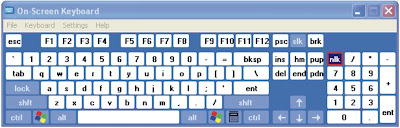
USE KEYBOARD WITH MOUSE (ON SCREEN KEYBOARD)


USE KEYBOARD WITH MOUSE

If you feel that your external keyboard is not working properly or some particular key is not functioning then you can use internal keyboard on your desktop screen. This property of keyboard is found in windows xp and seven. Just follow these steps
Go to start menu and press “run
Type  “osk
Now press enter.
(note. Don’t use commas)
you will see keyboard on your desktop screen. Now use mouse to click on keys for operation.


MS Word Tips & Tricks


Show formatting marks
To display formatting marks in Word 2010,click the paragraph mark symbol(¶)in the Paragraph section of the Home tab. To adjust which marks are displayed, open the File menu, choose Options, click Display and then tick the boxes as appropriate. Click OK to save changes.

Stop Insert key annoyances

In Word 2003, choose options from the Tools menu then select the Edit tab. Tick the ‘Use the INS key for paste’ box and click OK. The Insert key will now act as the paste function.

Link Text Boxes

To have text flow from one box to the next in Word 2010,click the Insert tab followed by Text box and insert text boxes into the document. Click the first box and then choose the Format tab within Drawing Tools. Click the Create Link icon in the Text selection then click the second box and the boxes will be linked.

Email Documents as PDFs

To email documents as PDFs in Word 2010, click the File button and choose Save & Send followed by create PDF/XPS Document. Click on the Create PDF/XPS button and follow the instructions to complete the process.

Make Text Fit

To shrink a document easily in Word 2003, choose Font from the Format menu then select the Character Spacing tab and use the Scale box to reduce the letter width and the Spacing box to reduce the space between letters.

Protect Documents with Passwords

To add password to Word 2007 doc., click the Protect Document icon on the Review tab. Click Editing restrictions, select how much formatting is allowed, tick the ‘Allow only this type of editing in the document ‘box and choose an option from the dropdown menu below. Click ‘Yes, Start Enforcing Protection’, type a password for the document twice and then click on OK.

Use thin font variations

Where space is tight, use fonts designed for small spaces, such as Arial Narrow rather than Arial – as this avoids having to use a smaller font size.

Browse documents by image

To check images in large Word documents click the small circle icon at the bottom of the right hand scroll bar. Click on the Browse by Graphic icon and then click the double arrows above and below the circle icon to skip through the document’s images.

Split the document view

To split doc. in two, so two parts can be viewed at one, in Word 2003 choose Split from the Window menu. In Word 2007/10, the Split button is on the ribbon’s View tab. Drag the mouse to position the split point then left-click.

View hidden text

To view hidden text in Word 2003 documents, choose Options from the Tools menu, select the View tab, tick the ‘Hidden text ‘box and click OK. This is useful for adding notes that won’t be printed.

MS Excel Tips & Tricks


Groups rows and columns

In Excel 2007/10, select a range of rows or columns, then click the Group dropdown menu on the Data tab and choose Rows or Columns. Now click on the Group button and a bar will appear above the spreadsheet, with numbers showing the different levels of grouping.

Reveal formulae

To quickly see all formulae used in an Excel spreadsheet, hold down Control and tap the ‘key (the button to the left of the number 1 on most keyboards). Press it again to reverse the change.

Remove duplicate data

To find and remove duplicate data items in Excel 2010, select the relevant area then click Remove Duplications on the Data tab. If there are column headings, select ‘My data has headers’ and click Select All. Click OK to remove duplicates.

Show recent documents

In Excel 2010, open the File menu, click Options. Click Advanced options then scroll down to the Display section and type the desired number into the ‘Show this number of Recent Documents ‘box.

Text to columns

If you have a list of forenames and surnames in a single column, it’s easy to separate them. In Excel 2003, select the affected column then open the Data menu and choose Text to Columns. Choose Delimited, click Next and tick the box (or boxes) representing the characters that delimit the names (typically a space). If the preview looks right, click Next followed by Finish.

Check formulae

In Excel 2003,open the View menu, point to Toolbars and choose Formula Auditing. On the toolbar that appears, troubleshoot problems.

Better Autofill

Autofill is a great timesaver but if you need to lock certain cell references before using it, then append a ‘$’ symbol before both the letter and number, so A1 would become $A$1.

Make a quiz

Write a question in one cell then create a list of answers in a column off to the right somewhere. Now position the editing cursor in the cell that will contain the correct answer, open the Data menu and choose Validation. Choose List from the Allow dropdown menu, click the small icon to the right of the Source box, select the answer list and click the right-most icon in the Data Validation window that has appeared.

Customise the ribbon

Click File followed by the Customize ribbon. Click New Group at the bottom right and then Rename. Type a name and click OK. Now drag and drop icons from the left-hand column into the new group.

Customise the Status bar

The Status bar at the bottom of the Excel window can be customized. Right-click on an empty part and chose an option from the pop-up menu.

Widnows 7 / Vista Tips & Tricks


Prevent display rotation

In Windows 7, right-click the Desktop and choose Graphics Options then Graphics Properties. Deselect the ‘Enable rotation’ option in the Rotate tab.

Adjust program volume

To adjust a particular application’s volume in Vista and &, right-click the volume icon in the Notification Area then click Open Volume Mixer. Now use the sliders to control each application’s sound level.

Create DVD slideshow

To burn slideshows to DVD in Vista and 7, click Start, type windows DVD maker and press Enter .Drag and drop photos and videos onto the windows, click Next, choose a menu style and add a soundtrack if wanted . Insert a recordable DVD and click Burn.

Organise backups

To keep backups in chronological order, use the date ot name the file- starting with the year(so ’2010-05-01-backup.zip’.for example).

Sort folders

Favorite files or folders can be kept at the top of the sort order in Windows Explorer by renaming them to start with either the ‘#’or’~’ symbol – just tap F2 to rename.

Restore previous file versions

To restore previous file versions in Windows 7, right-click a file and then chose Properties. Select the Previous Version tab, choose a version and then click Restore.

Aero Snap Shortcuts

In Windows7, hold the Windows key and tap the right or left arrow keys to have the current window set to the right or left edge of the screen.

Ultimate Control Panel

Expert Vista and 7 users can create a folder that contains all Control Panel tools. Click Start Followed by your username. Click New Folder(or from the File menu) button and name it ‘GodMode.{ED7BA470-8E54-465E-825C-9971204E01C}’.Double-click to see the Control Panel tools, Note this should not be used in 64-bit versions of Windows as it’s known to cause problems.

Fix unrecognized USB memory keys

If a USB memory key isn’t recognized, click start, tight-click(My) computer then choose Manage. Click Disk Management and look for an entry that lacks a drive latter: right-click it and choose ‘Change Drive Latter and Paths….’. Click Change and choose the drive latter from the dropdown menu.


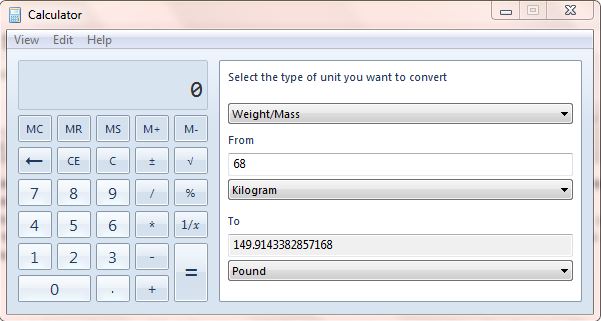
Convert units

Windows 7′s Calculator application has a Unit Conversion option on the View menu. You will also find mortgage and leasing tools on the Worksheets sub menu.calculator-unit-conversion


कम्प्युटर सम्बन्धी केही साधारण Tips & Triks हरु


Computer Tips and Tricks१, माउसको काम कि बोर्डले गर्नुहोस् यदि कुनै बेला तपाईंको माउसले काम गरेन भने के गर्नु हुन्छ ? तपाईंहरुलाई थाहा छ माउसको काम कि-बोर्डले पनि गर्न सकिन्छ ? त्यसको लागि Shift+Alt+NumLock कि थिच्नुस् र र ok गर्नुहोस् । अब तपाईंले माउसको काम Number key हरुबाट गर्न सक्नु हुन्छ ।

२, कम्प्युटरको password बिर्सनु भयो भने यदि तपाईंले आफ्नो कम्प्युटरको passwo...rd बिर्सिनु भयो भने यो step प्रयोग गरेर आफ्नो कम्प्युटर खोल्न सक्नु हुन्छ कम्प्युटर on गर्नुस् password Enter गर्ने ठाउँ देख् नु हुनेछ अब Ctrl+Alt+Deleteकि थिच्नुस् username लाई Change गरेर administrator राखिदिनुस् र ok गर्नुस्

Have some fun with Google search

For what purpose do you use Google search? Of course you will answer “For searching purposes”. But not only for the purpose like searching you may not know that it is even use for fun. In this post i will give you some tricks with which you will have some fun in google. For this you’ve to to following thing:
First Visit www.google.com as we will do these tricks in Google.
यो ब्लग अबलोकन गर्नुभएकोमा धन्यवाद। तपाईंहरुको पनि यस्ता लेख रचनाहरु छन भने हामीलाई मेल गर्नुहोस् हामी तपाईंको प्रतिभा यसै ब्लगबाट प्रकासित गर्नेछौ suchanasamachar003@gmail.com